Get a rating link without sending
Updated 25 Oct 2026
Sometimes you would rather send the link yourself: from your own WhatsApp chat, by email, or by showing it to your customer in person. RateMate gives you the link without sending anything, and it uses none of your monthly notifications.
There are two kinds of link. A private link is for one customer you have saved. The walk-in link is one link for everybody.
Get a private link for one customer
- Tap Request (on a computer, + Request Feedback) and pick the customer. You can also open them from Customers first.
- Add a Job reference or tag Who did the job? if you want to. Both are optional.
- Tap Get a Link Instead.
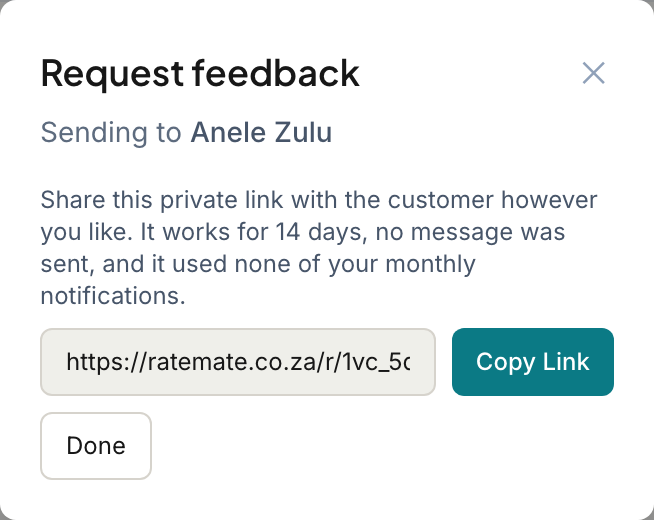
- Tap Copy Link. The button changes to "Copied!".
- Paste the link into WhatsApp, an email, or wherever you like, then tap Done.
The page tells you the link works for 14 days, that no message was sent, and that it used none of your monthly notifications.
Whoever opens the link rates the job, and the result is saved against that customer, the same as a normal request. It also shows in their history as a request. See Request statuses explained.
If you asked the same customer in the last 48 hours, RateMate checks first. Tap Create Link Anyway to carry on.
Copy the walk-in link
Your walk-in link is the same for every customer. Anyone who opens it enters their own name and number and rates you, so they are added to your customer list as well. See Walk-in ratings.
- Tap Request (on a computer, + Request Feedback).
- Under "No details handy?", tap Copy Walk-in Link.
Tap Get the QR code next to it if you want the printable version. See Your QR code and walk-in link.
Good to know
- A private link expires after 14 days. If your customer has not rated by then, the request shows as expired and you can get a new link. See My customer says the link doesn't work.
- Share the link with the right person. It is made for one customer, so it should not go in a group chat.
- You can only get a link for a customer who has not opted out.
- If your subscription has ended, links stop working until you reactivate.
- On the Starter plan the Request button is greyed out, so use the walk-in link from Manage instead.
Related articles
Still stuck? Email support@ratemate.co.za