Send a feedback request
Included in Trial, Standard and TeamUpdated 25 Oct 2026
A feedback request is the message that asks your customer to rate the job. It goes by WhatsApp, or by SMS if their number is not on WhatsApp. Each message uses 1 of your monthly notifications.
Sending needs the Trial, Standard or Team plan, or bonus notifications from a referral. On Starter you can still collect ratings with your QR code and walk-in link.
Send a request
- Tap Request, the round button in the middle of the bottom bar. On a computer, click + Request Feedback at the top of the left menu.
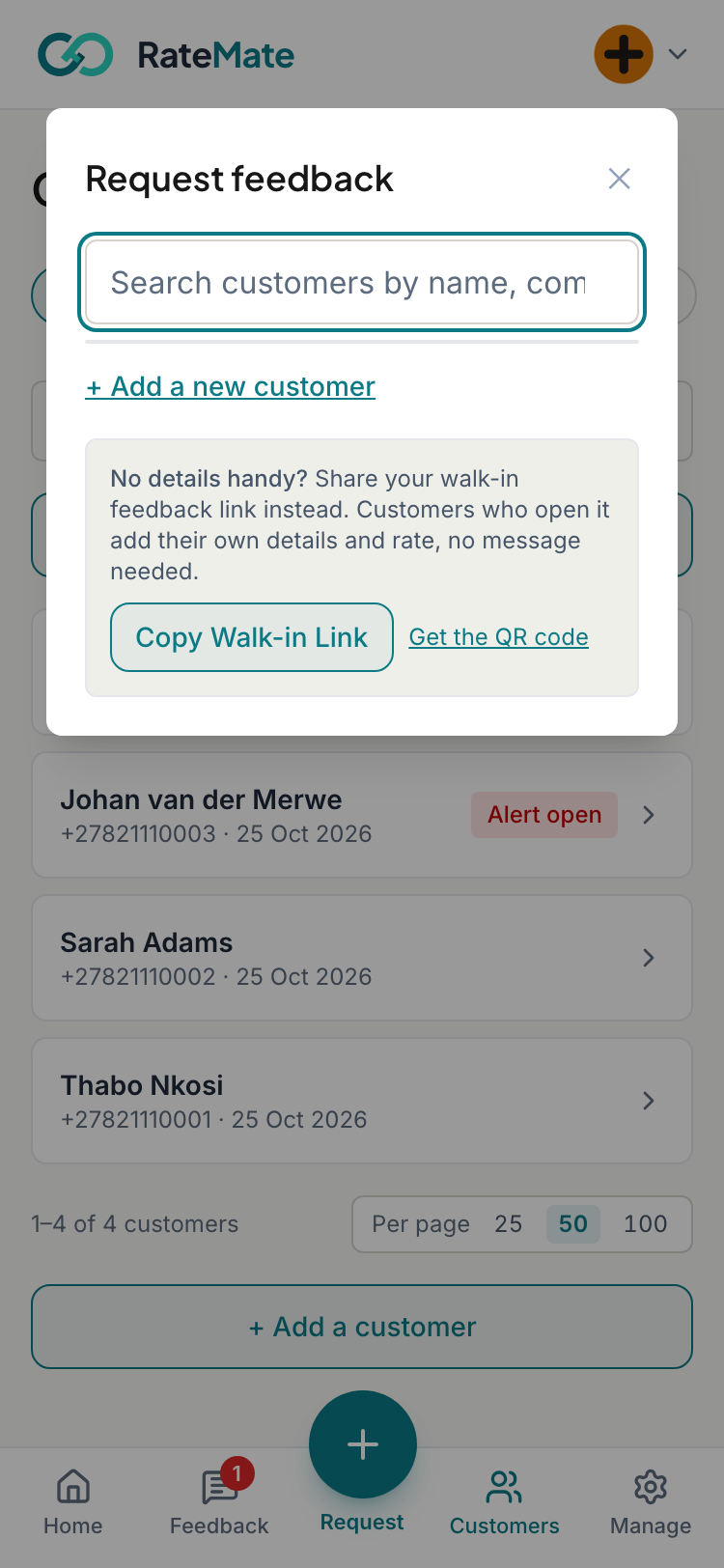
- Search by name, company or number, then tap the customer. A customer you have not saved yet? Tap + Add a new customer, fill in the form, and tap Add & Continue.
- Check the details (below), then tap Send Request.
The form closes once the request is queued. RateMate sends it within moments, and you can follow it on the customer's page. See Request statuses explained.
You can also start from a customer's own page. Open them from Customers and tap Request feedback from followed by their first name.
What you can set on the form
- Job reference (optional): for example "geyser repair 5 Jul". It appears in your records and alerts. Your customer does not see it.
- Who did the job? Shown when you have staff. See Tag who did the job.
- Message template: only appears if more than one template is available. Default is fine for most sends.
- Try WhatsApp first: appears when RateMate has learned the number is not on WhatsApp. The request would normally go by SMS. Tick this if your customer has joined WhatsApp since. If WhatsApp still fails, RateMate falls back to SMS.
If you asked recently
If the customer already has an unanswered request from the last 48 hours, you see "You already asked this customer for feedback" and how long ago. Tap Send Anyway to send another, or Cancel.
A different job reference counts as a different job, so it is not blocked.
When you cannot send
- Starter plan: the Request button is greyed out and takes you to billing.
- No notifications left: you see "You have no notifications left this month". Add more notifications, or on a paid plan wait for your allowance to renew.
- Opted out: these customers do not appear in the search. On their own page the button reads "Opted out · cannot contact". See Opt a customer out or back in.
- Subscription ended: you see "Your subscription has ended" until you reactivate.
Stuck? See Why can't I send a request?. No message to send? Use Get a rating link without sending instead.
Related articles
Still stuck? Email support@ratemate.co.za