What your customer receives
Updated 25 Oct 2026
Your customer needs no app and no login. They get one message that names your business, and they rate you from it. This is what that looks like from their side.
The WhatsApp message
RateMate sends from its own WhatsApp number, not yours. The message greets your customer by first name, thanks them for choosing your business by name, and asks how the job went. It ends with "Reply STOP to opt out."
RateMate can send the message in one of two shapes, depending on the message it is using at the time:
- Rating buttons. The message has a header picture with your logo and brand colour, and five buttons from 5 stars ("Excellent") down to 1 star ("Very poor"). One tap rates you, right in the chat.
- A rating link. The message holds a short link. It opens your rating page in the phone's browser.
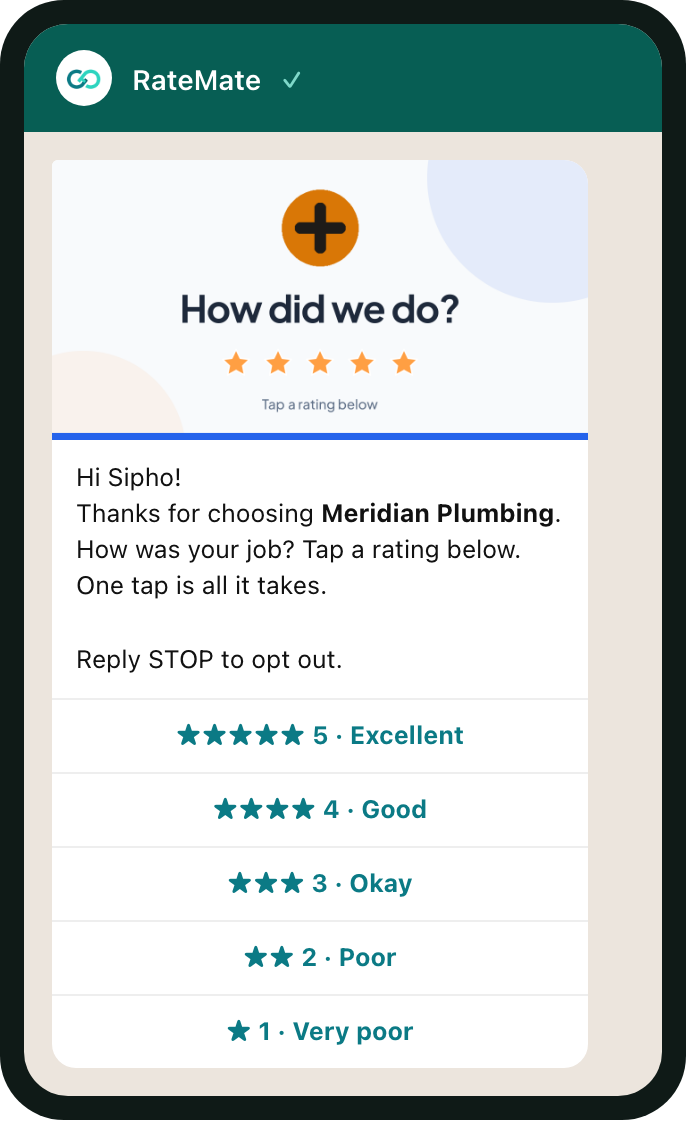
After a button tap, your customer gets a thank-you in the same chat, an invitation to reply with a comment, and a Google review link if you have connected Google. See After they rate.
The exact wording is set by RateMate and changes now and then, so do not rely on one particular sentence. Your business name is always in it.
When it goes by SMS
If your customer's number is not on WhatsApp, the request goes by SMS. If a WhatsApp send fails and RateMate's retries run out, it sends the same request by SMS instead, with the same rating link. The SMS is shorter and plain text. It names your business, carries the link, and ends with "Reply STOP to opt out." SMS never has rating buttons.
You can see which way a request went on the customer's page. See Request statuses explained.
A customer who scans your QR code
A customer can also start the chat themselves. On your walk-in page they tap Rate on WhatsApp instead, and WhatsApp opens with a message ready to send.
- A customer you already have: RateMate replies with a list. They tap Rate now and pick a score.
- A new number: RateMate first asks for their name, and says that replying means your business may store their name and number to follow up on their feedback. If they do not reply with a real name after a second try, RateMate stops asking and sends nothing more.
- An opted-out customer: RateMate ignores the message.
Good to know
- Delivery depends on WhatsApp and your customer's phone. A message can arrive late, or not at all, if the phone is off or the number is wrong. See My customer didn't get the message.
- Your customer can reply STOP at any time. See How customers opt out.
- Your customer does not see the job reference you type when you send.
- To send a request, see Send a feedback request.
Related articles
Still stuck? Email support@ratemate.co.za