The rating page
Updated 25 Oct 2026
The rating page is the web page behind the link in your customer's message. It is one screen with your logo on it, and it needs no login.
What your customer does
- They open the link. The page shows your logo (if you added one), a question and 5 stars. By default the question reads "How was your experience with" followed by your business name.
- They tap a star from 1 to 5.
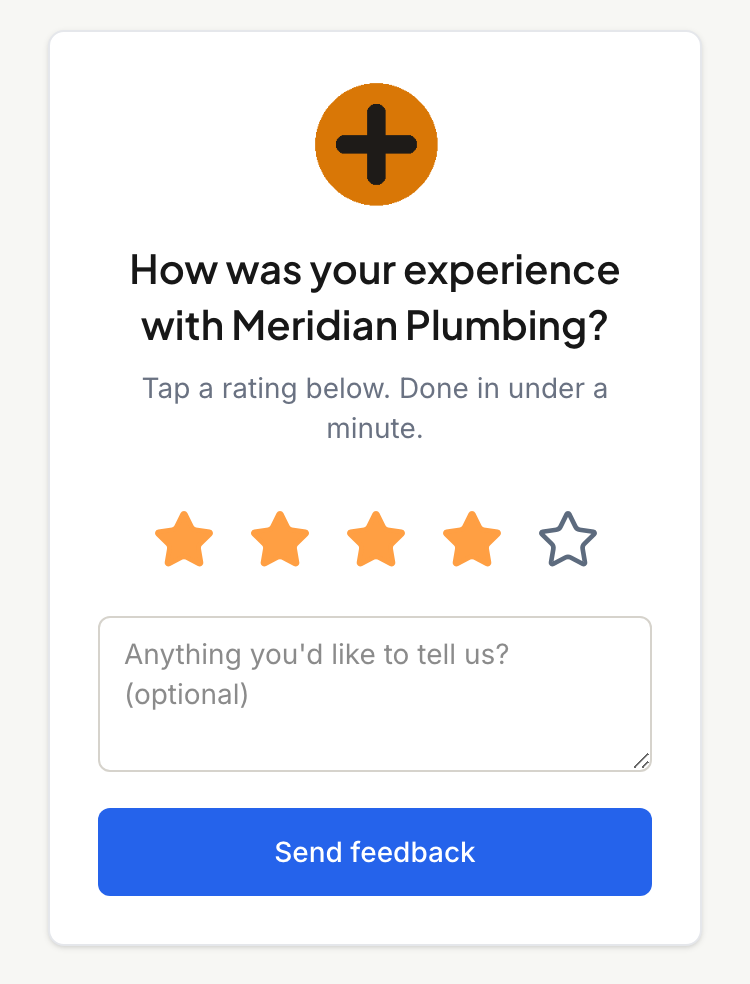
- A comment box and a button appear. The comment is optional, and the box starts with "Anything you'd like to tell us? (optional)".
- They tap Send feedback.
The page then shows the thank-you. See After they rate.
They do not enter a name or number, because RateMate already knows who the link was made for. You can change the question, the button and the thank-you wording under Customise your rating page.
The footer
At the bottom, your customer reads that your business collects the feedback with RateMate and may store their details to follow up, and that they can opt out at any time. A Privacy policy link opens in a new tab, so they do not lose their place. A small "Powered by RateMate" line links to the RateMate site.
When the link no longer works
- Already rated. Opening the link again shows the thank-you, not the stars. A link takes one rating.
- Expired. A rating link lasts 14 days from when it was made. After that the page says "Link expired" and "This feedback link has expired." unless you reworded it. Your customer needs a fresh request from you. See My customer says the link doesn't work.
- Not valid. A link that does not exist, or that belongs to a business that has closed its account, says "Link not found" and "This feedback link is not valid."
- Paused. If your subscription has lapsed, the page says "Thanks for thinking of" followed by your business name, then "They're not collecting feedback at the moment. Please check back later." Customers who already rated still see their thank-you. Collecting starts again when you reactivate.
Good to know
- Anyone who has the link can open it, so share it only with the customer it was made for.
- The page works in any phone browser, and on a computer.
- You can get a link without sending a message. See Get a rating link without sending.
Related articles
Still stuck? Email support@ratemate.co.za