See a customer's history
Updated 25 Oct 2026
A customer's page shows everything between you and them in one place. It is worth a look before you ring someone who is unhappy, because you can see if it has happened before.
Open a customer
- Tap Customers.
- Tap the customer's name. On a computer the page opens on the right of the list.
If the customer has an open alert, a red strip at the top says "Alert open. Call Sipho back". Tap it to go to the response, then see Handle a low-score alert.
What you will see
- Details: their phone number, status (Contactable or Opted out), channel, consent and the date they became a customer.
- Feedback history: each request and its outcome, with the score, comment, job reference, date and whether an alert was open or resolved. Tap a row for the full response. You see the latest 4, and Show all loads the rest.
- Outstanding requests: requests still waiting for a reply, listed apart from the rest.
Job references and who did the job
A job reference is a short note on a request, like "geyser 3 Jul". It shows in the history list. To add or change one, open the response, find the Job line and tap the pencil (Add job note or Edit job note).
Open a response to see Job done by, if a staff member was tagged when the request was sent.
Their other ratings
On any response, Previous feedback (on a computer, History with the customer's first name) lists their earlier ratings and the average, for example "3 previous responses · average 4.3".
The audit trail
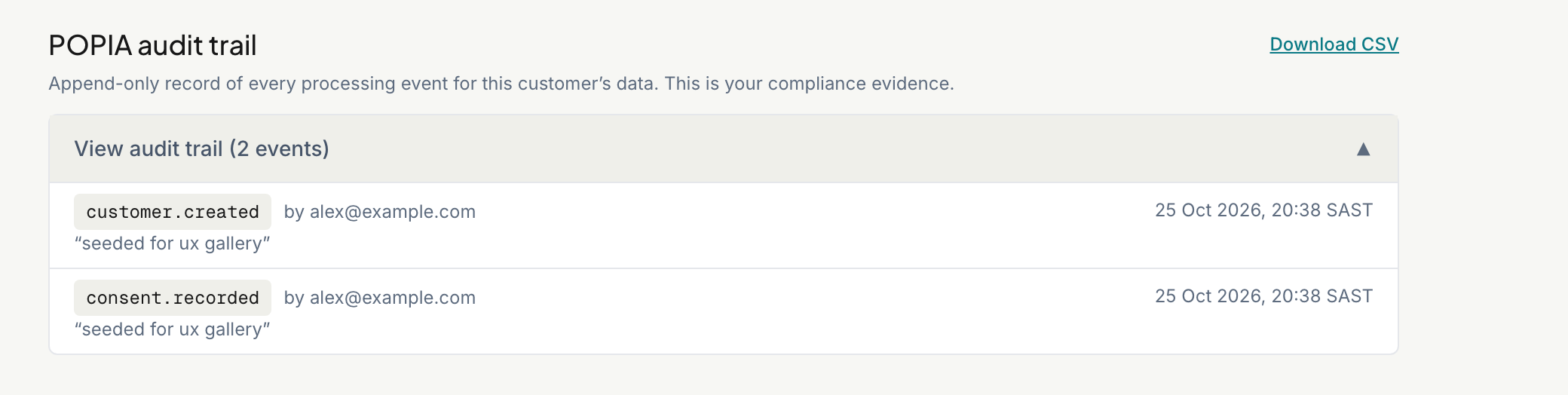
Every time RateMate handles this customer's data, it writes a line: requests sent, consent changes, opt-outs and downloads. The trail cannot be edited. See How RateMate helps you stay POPIA compliant.
- Tap View audit trail to read it. Each line shows what happened, who did it and when.
- Tap Download CSV to save it as a spreadsheet. The download is itself recorded in the trail.
Delete a customer's data
If a customer asks for their personal information to be erased, use Delete this customer's data… at the foot of the page, then type delete to confirm. It removes their name, number, consent records and comments for good. The anonymous scores and the audit record of the deletion stay. See Handle a customer's data request for the full steps.
Related articles
Still stuck? Email support@ratemate.co.za