Connect your Google business page
Only owners can do thisUpdated 25 Oct 2026
When you connect your Google business page, every customer who rates you is invited to leave a Google review. Only owners can connect it.
Connect your page
- Tap Manage, then Business profile. On a computer, tap Settings.
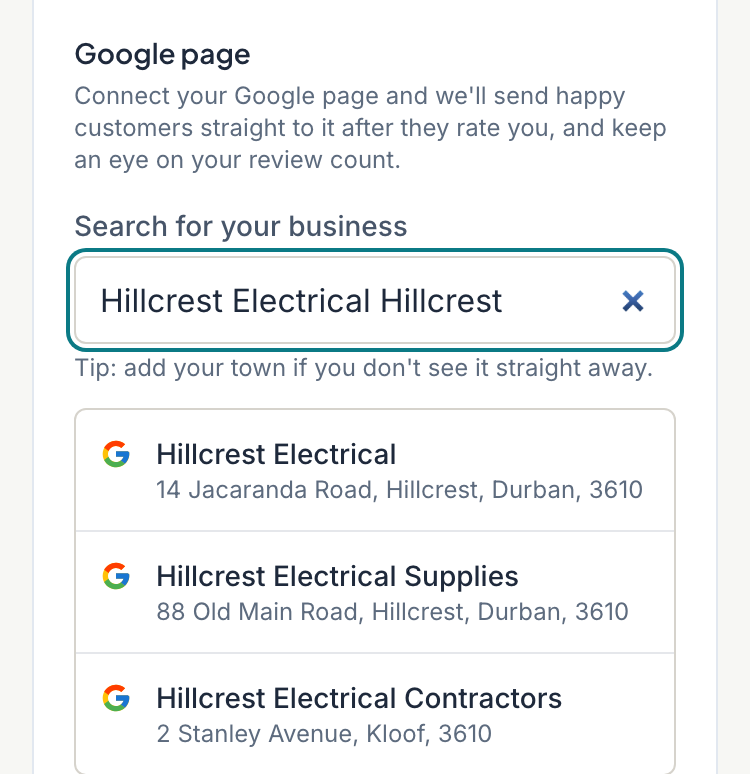
- Find the Google page section. If nothing is connected, a search box is already filled with your business name. Edit it if you need to. Adding your town helps.
- Tap your business in the results. You see "Connecting…" and then "Connected to" with its name.
Connecting saves straight away. You do not need to tap Save.
If the search is not available, the section says so. Open Enter the link manually instead, paste your Google review link, and tap Save. Google Place ID (optional) lets RateMate count your Google reviews, so add it if you can.
Change or disconnect it
When a page is connected, you see Change and Disconnect.
- Change opens the search so you can pick a different page. If you typed your own review link earlier, Change keeps it. Replace it under Enter the link manually instead.
- Disconnect removes your Google details and saves the form, including any other edits you made. The invite stops until you connect again.
If you do not have a page
Tap I don't have a Google business page. The section then says "You told us you don't have a Google business page." Customers still rate you, but they are not shown a review invite.
Created one since? Tap I've created one, connect it now, then search as above.
What connecting changes for your customers
- After a customer rates you, the thank-you page shows a Google review button. It says "Leave us a Google review ⭐" unless you changed the wording.
- A customer who rates you in a WhatsApp chat is sent the same Google link.
- Your Home screen (Dashboard on a computer) shows your Google review count and rating. See Your Home screen.
Every customer who rates you gets this invite, whatever score they gave. RateMate never hides it from low scores.
Good to know
- The count on Home needs the Google Place ID. Searching and picking your business sets it for you. RateMate checks Google overnight, so the count can take a day to appear.
- You can also connect Google while setting up. See Go through the setup steps.
Something not working?
- Your business is not in the results. Add your town to the search, or use Enter the link manually instead.
- "Search isn't available right now." Use the manual link for now.
Related articles
Still stuck? Email support@ratemate.co.za