Refer a friend and earn notifications
Only owners can do thisUpdated 25 Oct 2026
If you know another business owner who would use RateMate, you can send them your referral link. When they sign up and subscribe to a paid plan, you earn bonus notifications. Only owners see this screen.
Share your link
- Tap Manage, then Refer a friend. On a computer, tap Settings, then Refer a friend.
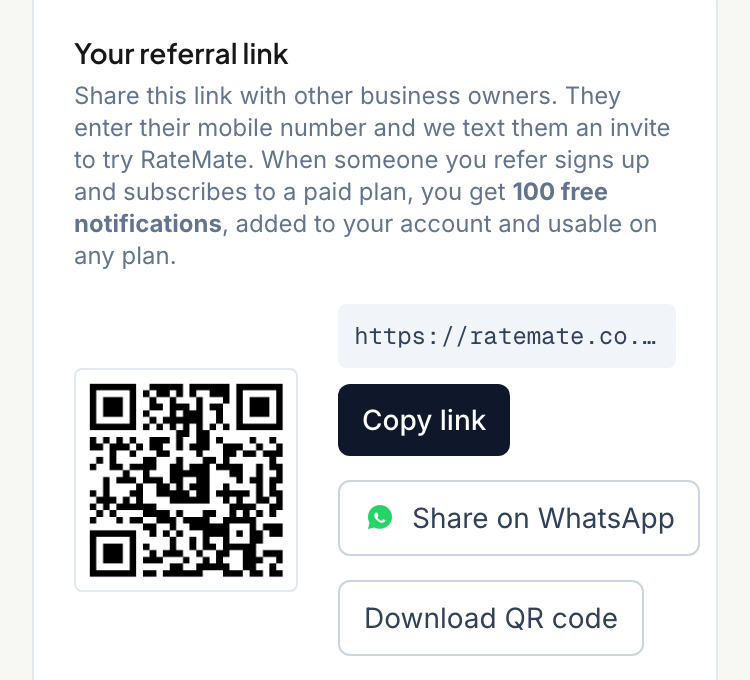
- Under Your referral link, use one of these:
- Copy link copies it. The button briefly says "Copied!".
- Share on WhatsApp opens WhatsApp with a ready message. If your phone offers it, Share… opens the other apps you can share to.
- Download QR code saves a picture of the code, called referral-qr.png, so you can hand it out or print it.
What your friend sees
Your friend opens the link and sees a page saying your business recommends RateMate. They type their mobile number, tick the box agreeing that RateMate may text them a one-off sign-up link, and tap Text me the link.
RateMate texts them the sign-up link. They start a free trial from it.
When you get the reward
You are rewarded when the business you referred makes its first payment for a paid plan. Signing up for the trial is not enough. Each referred business rewards you once, and the reward of 100 notifications is added to your account straight away.
You will not get the reward if your own account has been closed by then.
Keep track
Three numbers on the same screen show where you are:
- Bonus notifications: how many bonus notifications you have left.
- Successful referrals: friends who signed up and paid, and rewarded you.
- Invites in progress: friends who have been invited or signed up, but have not paid yet.
Good to know
- They never expire. Bonus notifications are kept apart from your monthly allowance, so they are not reset each month. RateMate uses your monthly allowance first, then your bonus notifications.
- They work on any plan, Starter included. Starter normally cannot send requests. With bonus notifications in your account, it can. They also unlock low-score alerts there. See Set up your business profile.
- A notification is one message sent to a customer. To buy more, see Buy extra notifications. To see how sending works, see Send a feedback request.
Related articles
Still stuck? Email support@ratemate.co.za