Run more than one business
Updated 25 Oct 2026
One login can run several businesses. Each has its own customers, ratings, settings and plan, and you switch between them in a tap.
Switch between your businesses
- Open the switcher. On a phone, tap your business name or logo at the top of the screen, or tap Manage, then Business. On a computer, click your business name or logo in the top bar or at the top of the left menu.
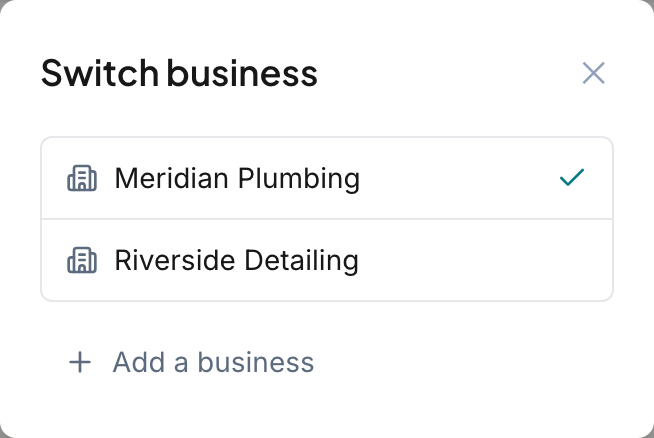
- In the Switch business box, tap the business you want. A tick shows the one you are in.
The screen reloads on that business. Switching only changes the device you are using. Your other signed-in devices stay where they are.
Add a business
- Open the switcher. With only one business, the box is called Add a business, so tap the Add a business button. With more than one, tap Add a business under the list.
- Type the Business name. It needs at least 2 characters.
- Tap Add business.
You land in the setup steps for the new business. See Go through the setup steps.
Each business is billed separately. The new one starts its own free trial, and notifications are never shared between businesses. To keep it sending after the trial, it needs its own plan.
You can add up to 2 businesses in 24 hours.
If you already have one with that name
If the name matches a business you already have, the box says "You already have" followed by that name, and nothing is created yet. You get 3 choices:
- Cancel goes back without adding anything.
- Add anyway creates a second business with the same name.
- Open it switches to the one you already have.
Change the name and the warning goes away.
Choose a business on WhatsApp
WhatsApp commands work for a business once you verify your number on it. See Manage your account settings. Switch to the business first, then verify the same number there.
If your number is verified on more than one business, WhatsApp asks "Which one do you want to work with?" and shows a list called Choose a business. Tap Choose and pick one. RateMate remembers your pick for about 24 hours, then asks again.
To change it earlier, open the menu and pick Switch business. That option only appears when your number is on more than one business.
Good to know
- Your sign-in email and password are the same for every business.
Related articles
Still stuck? Email support@ratemate.co.za