Change or cancel your plan
Only owners can do thisUpdated 25 Oct 2026
You can move up a plan straight away, move down at your next renewal, or cancel. Only owners can do this. Prices are in Plans and prices.
Open the billing screen
Tap Manage (on a computer, Settings), then Billing. Below your balance is a list of plans. It is headed Change plan once you are paying, or Choose a plan if you are not.
Upgrade
- Under Change plan, find the plan above yours.
- Tap its button, which reads Upgrade for R{n} now, where R{n} is the amount in rand and cents.
- PayFast opens. Pay there.
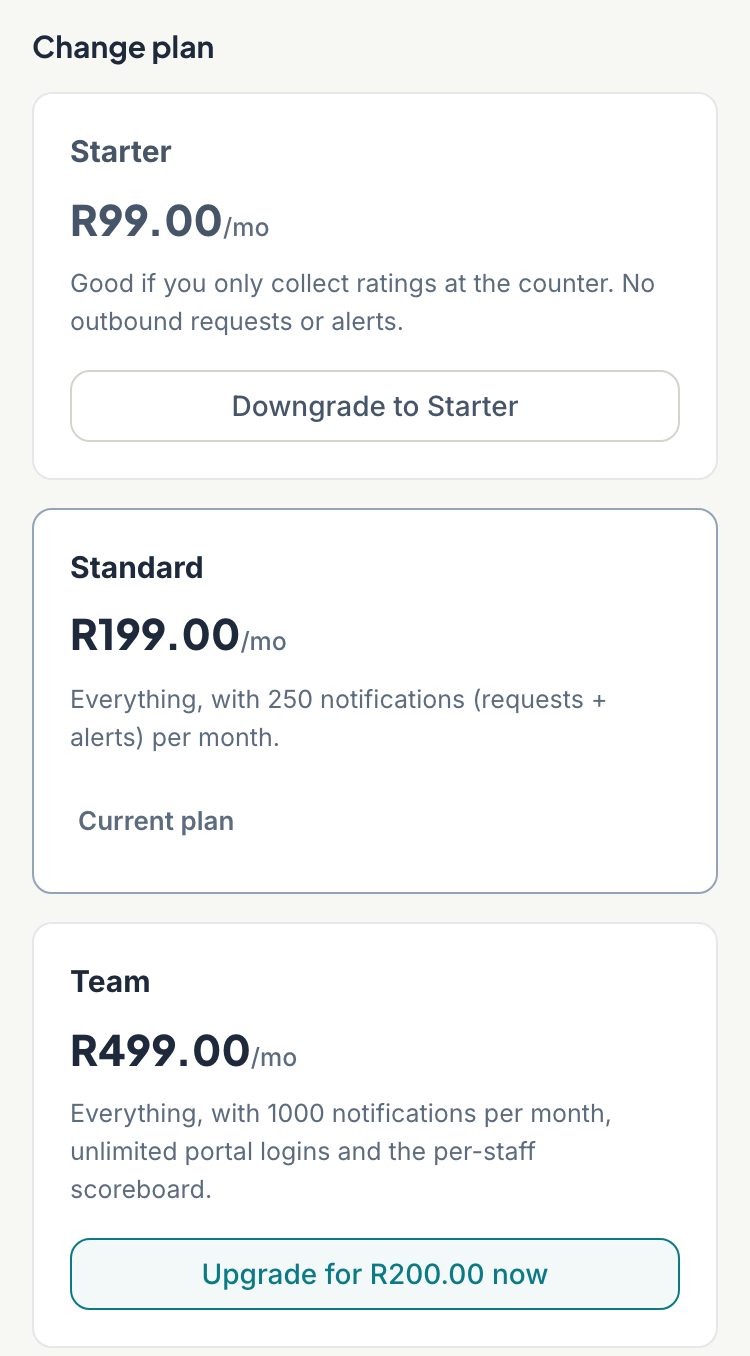
Your new plan starts as soon as PayFast confirms the payment, usually within a minute. RateMate shows "Upgrade received. Your new plan activates as soon as PayFast confirms the payment."
The amount is pro-rata. It is the difference in price between the two plans, shared over a 30 day month, for the days left until your renewal. The lowest RateMate will charge is R5, even if the sum comes to less. You get the new plan's full monthly allowance straight away, your renewal date does not move, and each renewal after that bills the new price.
On renewal day the plan card says "Upgrades open again once your renewal payment comes through." Upgrade once it has.
Downgrade
- Under Change plan, tap the cheaper plan's button, such as Downgrade to Starter.
- Read "The new plan takes effect at the end of your current paid period. Confirm?" and tap Confirm. Tap Never Mind to leave things as they are.
Nothing is charged now. You keep your current plan until the renewal date, then the cheaper plan starts. Until then the balance card shows "Changes to Standard" (or whichever plan) and the date.
Cancel
- At the bottom of the billing screen, tap Cancel subscription.
- Read "Your plan keeps working until {date}, then your reviews become read-only. Confirm?" and tap Confirm.
The status changes to Cancelling, and the balance card shows "Cancels" and the date. You keep your plan, including its notifications, until that date. After that the status reads Ended (read-only). You can still sign in and read your feedback, customers and history, but you cannot send requests, and your QR code and links stop collecting ratings.
If RateMate cannot reach PayFast, you see "Could not cancel with PayFast. Please try again or contact support." Try again, or email support@ratemate.co.za.
Undo a downgrade
While a downgrade is waiting, a yellow strip shows Keep Current Plan. Tap it to cancel the downgrade and stay on your current plan. It works straight away, with no confirm step.
Changed your mind after cancelling?
Keep Current Plan only undoes a downgrade. Once you cancel, your renewal payments stop and the other plans say "Available again after" your end date. Your plan keeps working until then. To carry on after it ends, choose a plan again from the Billing screen. See If a payment fails for the steps.
To come back after your plan has ended, see If a payment fails.
Invoices
RateMate does not show invoices or receipts in the portal yet. If you need a record of a payment, email support@ratemate.co.za.
Good to know
- Cancelling does not erase your data. To do that, close your account.
- There are no refunds for the rest of a billing period after you cancel. You keep full access until the period ends instead. The rules are on the Refunds and cancellation page, ratemate.co.za/refunds. If you were billed by mistake, email support@ratemate.co.za.
Related articles
Still stuck? Email support@ratemate.co.za