Close your RateMate account
Only owners can do thisUpdated 25 Oct 2026
Closing your account stops RateMate straight away and erases your data once a 7-day grace period is up. Only owners can do it. If you only want to stop paying, you do not need to close: cancelling a subscription keeps your data.
Before you start
Download your export first. Once you close, nobody on your team can sign in to fetch it.
Close your account
- Tap Manage, then Account (on a computer, tap Settings, then Account).
- Scroll to Close your account at the bottom and tap Close my account….
- Type Your password.
- Type close in the box.
- Tap Permanently Close Account.
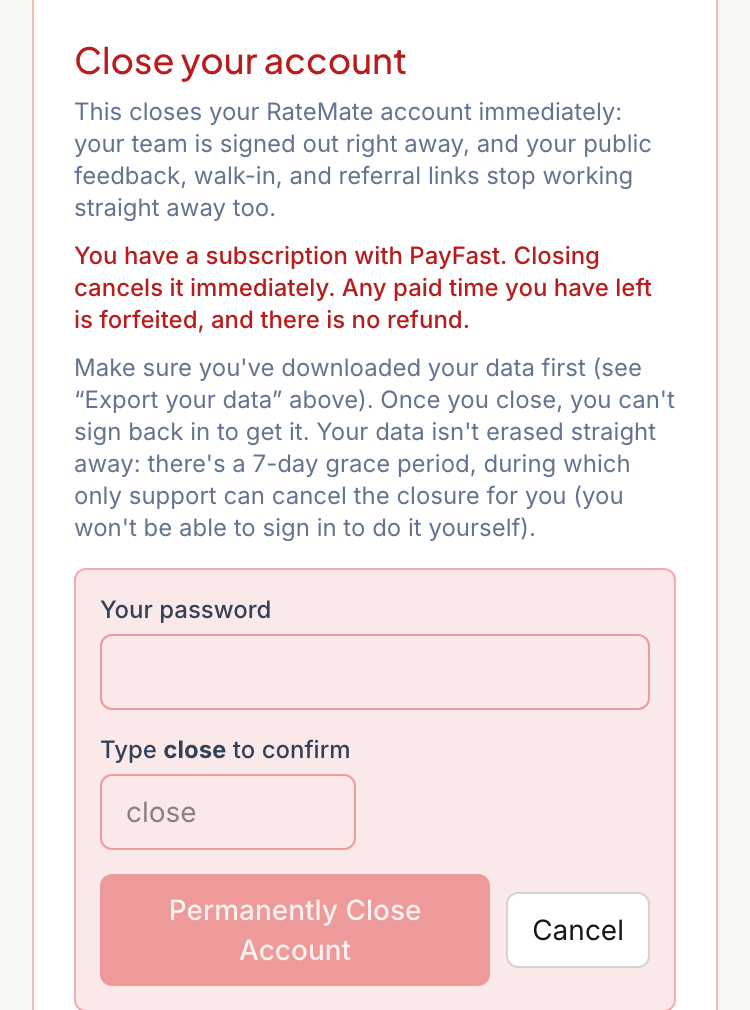
If the password is wrong, nothing happens and you see "That's not your password."
What happens straight away
- You and your team are signed out. If you also belong to another live RateMate business, you stay signed in and are taken to that one.
- Your rating links, walk-in link and QR code, referral link, staff score links and public profile page stop working.
- If you have a live PayFast subscription, it is cancelled on the spot. Any paid time you have left is forfeited and there is no refund. If PayFast cannot be reached, the account stays open and you see an error, so try again or contact support.
The 7-day grace period
Your data is not erased straight away. You cannot sign in during the grace period, so you cannot undo it yourself. If it was a mistake, contact support at support@ratemate.co.za straight away. They can reverse the closure until the 7 days are up, and cannot after that.
A reversal does not restart your billing. The PayFast subscription stays cancelled, so you will need to choose a plan again.
What is erased after the 7 days
Erasure runs overnight once the 7 days are up.
- Every customer, with their name, number, comments and job references, the same way a single customer is erased. See Handle a customer's data request.
- Your team's names, emails and passwords, and your business name, logo, Google details and verified phone number. If someone on your team also belongs to another live RateMate business, their login is kept for that business.
- Your staff names, and their personal score links.
Erased data can remain in RateMate's backups for up to 90 days, after which those backups are deleted.
What is kept
- The audit trail, including a line showing the account was closed and erased. It can still include your team members' email addresses, your WhatsApp number and staff names.
- Anonymous scores, with no names or numbers.
- Billing and payment records, without the buyer's personal details. South African law makes businesses keep financial records for longer than personal information.
Copies RateMate cannot delete
- Low-score alerts already sent to your WhatsApp or email inbox. They can contain a customer's name and comment.
- Messages held by WhatsApp (Meta) and the SMS provider, under their own terms.
- PayFast's own record of you as a buyer.
- Anything you saved yourself, such as your export.
Related articles
Still stuck? Email support@ratemate.co.za