Customise your reply drafts
Only owners can do thisUpdated 25 Oct 2026
When you tap WhatsApp or SMS to reply to a customer, RateMate fills in a message for you. You can change the wording so it sounds like you. Only owners can do this.
Change your drafts
- Tap Manage, then Replies.
- Pick a tab: Happy (4–5), Unhappy (1–3) or No score.
- Edit the text under Draft message. A live preview shows how it will look in WhatsApp.
- Do the same for the other tabs if you want to.
- Tap Save. You will see "Saved."
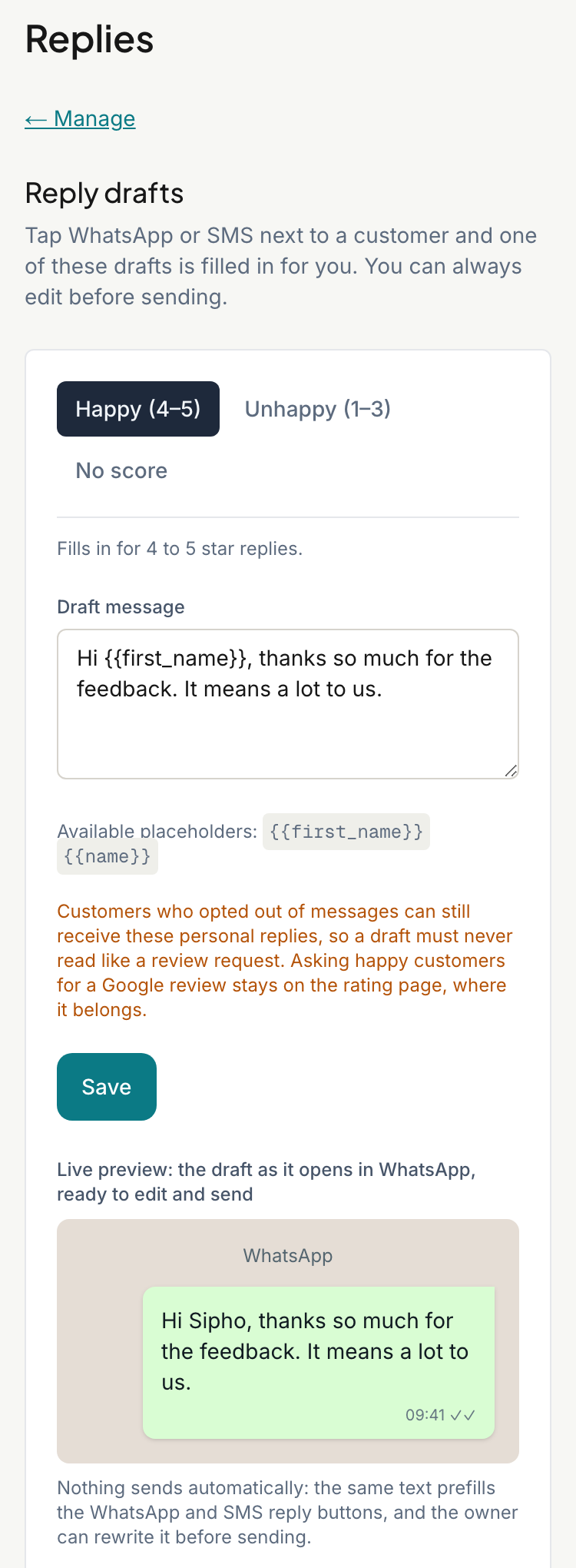
Each draft needs some text and can be up to 500 characters.
Which draft is used
RateMate picks the draft from the customer's score:
- Happy (4–5) for 4 or 5 stars.
- Unhappy (1–3) for 1, 2 or 3 stars.
- No score for a reply with no rating attached. Every reply button today sits on a rated response, so this one is rarely used.
This follows the score only. It does not depend on your alert threshold.
Add the customer's name
Type {{first_name}} where the customer's first name should go, or {{name}} for their full name. The preview shows "Sipho" and "Sipho Dlamini" as examples. A draft such as "Hi {{first_name}}, thanks for the feedback." goes out as "Hi Sipho, thanks for the feedback."
Go back to the defaults
- Tap Reset Fields to Default Copy to put RateMate's wording back in the boxes. Then tap Save to keep it.
- Or tap Use RateMate's default drafts at the top. This shows once you have saved your own, and switches back straight away.
Good to know
- Nothing is sent for you. The draft opens in WhatsApp or your messages app, and you can rewrite it before you send.
- The drafts fill in the WhatsApp and SMS buttons on responses and alerts, including the alert list on Home.
- Keep them personal. Do not ask for a Google review in a reply. Customers who rated you are already invited to review you on the rating page.
- Team members can use the drafts but cannot change them.
Related articles
Still stuck? Email support@ratemate.co.za