Check your feedback on WhatsApp
Only owners can do thisUpdated 25 Oct 2026
Catch up on your ratings between jobs without opening the portal. This works on every plan, even if your subscription has lapsed.
See your latest responses
- Send feedback. summary, new and stats work too. Or open the menu and tap Latest responses.
- RateMate replies with a summary, for example "3 new responses since you last checked, averaging 4.3 out of 5." If there is nothing new it says "No new feedback since you last checked." If alerts are open it adds "1 alert needs your attention."
- Tap View responses. You see your latest 5 ratings. Each row shows the stars and your customer's first name, then the start of the comment and the date.
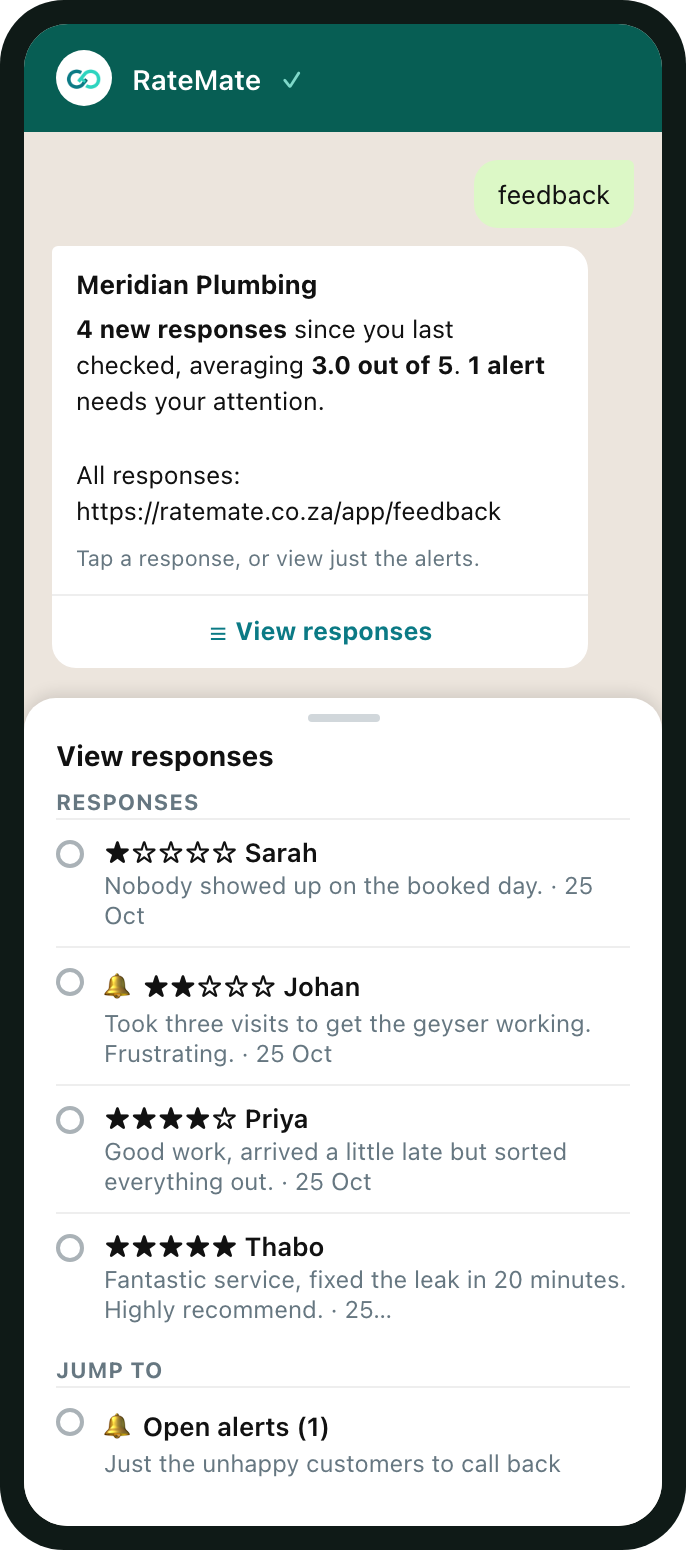
- Tap a row to read the full comment.
A row with a bell means that response still has an open alert. When any are open, the list ends with Open alerts, a shortcut to your alerts.
With no responses yet, you get the summary and a link to your feedback in the portal.
Read one response
Tapping a row shows the stars and date, your customer's name, their comment and a link to the full response in the portal. If they left no comment, it says "They left no comment." Tap Menu to go back.
Your customer's number only shows when the response has an open alert, because that is when you need to call them. Those responses also get Mark resolved.
What clears the "new" count
"New" means new since you last checked, and WhatsApp keeps its own marker for that. It moves when you tap a response in the chat, or when you open the Feedback tab in the portal as the owner. Reading the summary alone does not move it, because you have seen a count, not the feedback.
This marker is separate from the unread badge in the portal, which tracks which responses you have opened there. See Read your feedback.
Check your plan and notifications
Open the menu and tap Plan and quota. RateMate replies with your plan, how many notifications are left, any bonus credits, and the renewal date.
- On Standard and Team the count is your monthly allowance, which refills when the plan renews.
- On the free trial the reply words it as "left this month", but the trial is a one-off set that does not refill. See Your free trial.
- On Starter there is no count. It says there are no outbound requests on the plan, but customers can still rate you with your QR code or link. Any bonus credits from referrals are listed.
- If your subscription has lapsed, it says sending and collecting are paused.
Related articles
Still stuck? Email support@ratemate.co.za