The WhatsApp menu
Only owners can do thisUpdated 25 Oct 2026
The menu is a list of everything you can do on WhatsApp. Open it any time and tap a row.
Open the menu
- Send menu to RateMate. hi, hello, hey, help and options work too.
- RateMate replies with your business name as the heading and "Hi Mike, what would you like to do?" (with your own first name). The footer says "Replies here are free and only you see them."
- Tap Menu, then tap a row.
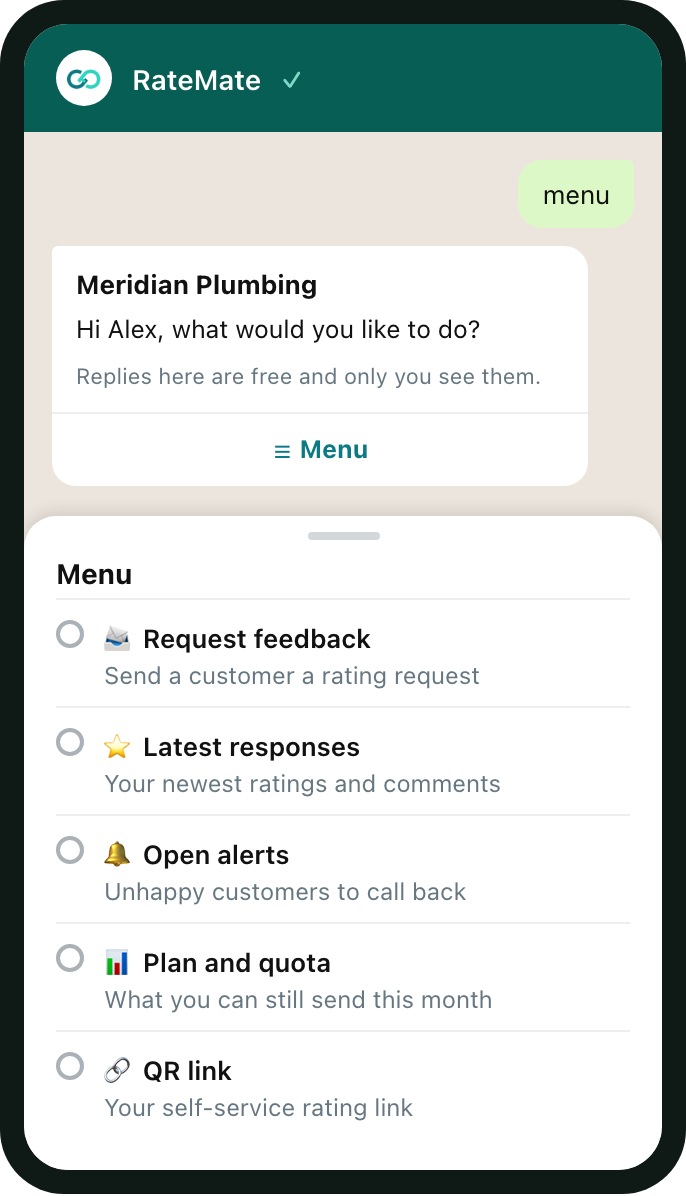
The word can sit anywhere in your message, in any case. "Hi there" opens the menu. A message that has a phone number in it is treated as a request to send, so it never opens the menu. start does not open it, because WhatsApp treats that word as a customer opting in.
What each row does
- Request feedback: "Send a customer a rating request". See Send a request from WhatsApp.
- Latest responses: "Your newest ratings and comments". See Check feedback on WhatsApp.
- Open alerts: "Unhappy customers to call back". See Handle alerts on WhatsApp.
- Plan and quota: "What you can still send this month". See Plans and prices.
- QR link: "Your self-service rating link". RateMate sends your QR code as a picture with the link. Anyone who scans or taps it can rate you, and it costs nothing. See Your QR code and walk-in link.
- Switch business: "Work with a different business". It only shows if your number runs more than one business.
An old menu in the chat still works. If a row no longer applies, RateMate says "That one is not available any more. Text menu to start again."
Anything else you send
RateMate treats other text as a customer name to look for. See Find a customer on WhatsApp. If nothing matches, it replies "I didn't recognise that" and points you back to menu.
If you run more than one business
If your verified number belongs to more than one business, RateMate shows Choose a business the first time it needs to know: "Your number is linked to more than one business. Which one do you want to work with?" Tap Choose, then pick one. RateMate opens that business's menu and remembers your pick for 24 hours.
Tap Switch business to change. The menu and your latest responses name the business in their heading.
If you send feedback before picking, you get a short summary for each business instead.
Related articles
Still stuck? Email support@ratemate.co.za