Handle alerts on WhatsApp
Only owners can do thisUpdated 25 Oct 2026
When a customer rates you low, you can call them back and close the alert without leaving WhatsApp. Reading and resolving alerts works on every plan.
How alerts reach you
RateMate messages your verified number when a rating is at or below your threshold, if you have chosen to get alerts there. The message links to the full response. Phone alerts need the Trial, Standard or Team plan, and each one uses 1 notification. If WhatsApp is not available, RateMate falls back to SMS, then email. See Handle a low-score alert for how that works, and I didn't get a low-score alert if one is missing.
To deal with it in the chat, send menu and follow the steps below.
Look at your open alerts
- Open the menu and tap Open alerts. You can also tap Open alerts at the end of your latest responses.
- RateMate lists them: "2 unhappy customers to call back. Tap one for details." Tap View alerts. Each row shows stars, first name, the start of the comment and the date. It lists the 9 most recent, with a link to the rest in the portal.
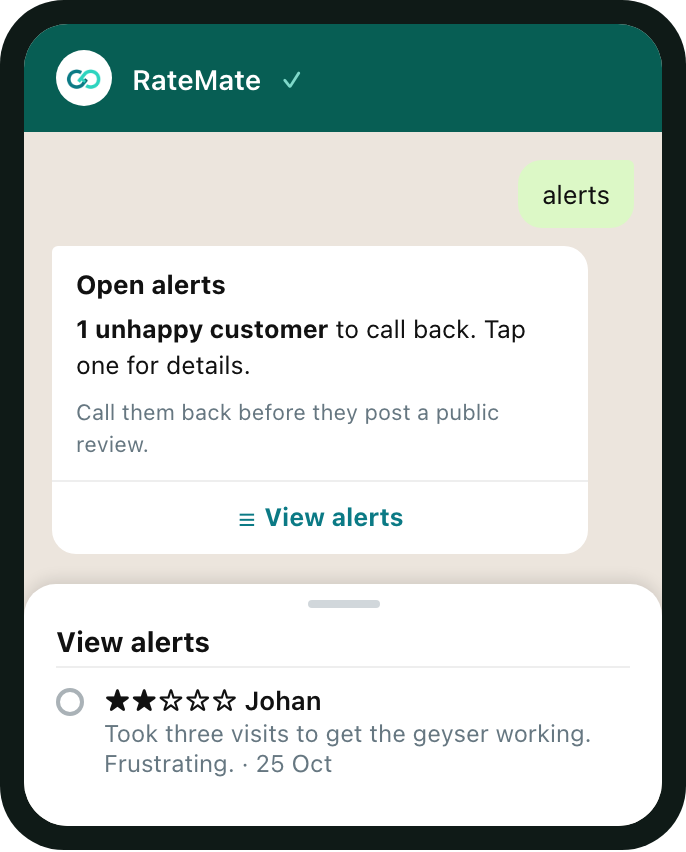
- Tap a row. You see the stars and date, your customer's full name and number, the job reference if there is one, and their comment.
Call them from your phone using that number. The detail also has a link to the response in the portal.
If there are none, RateMate replies "No open alerts. Nice."
Mark it resolved
- After you have spoken to them, tap Mark resolved on the detail.
- RateMate replies "Done, marked as resolved. ✅" It counts as put right in the portal, the same as marking it there.
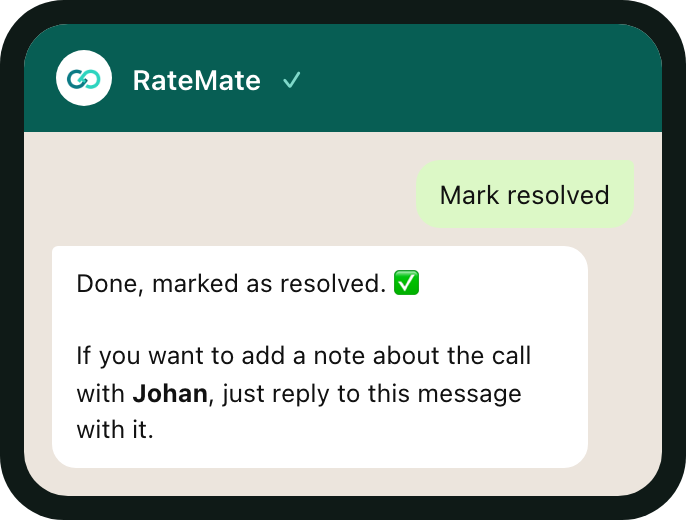
- To keep a note about the call, reply to that message with it. RateMate answers "Noted, thanks. It's been saved on the alert."
Reply within 10 minutes. The note can be up to 500 characters. Your next message becomes the note, unless it is a command such as menu. After 10 minutes, add the note in the portal instead.
An alert that is already resolved shows "That alert was already resolved."
Good to know
- You can resolve from a response you opened in Latest responses too, when it has an open alert.
- Only your verified number can do this. See What you can do on WhatsApp.
Related articles
Still stuck? Email support@ratemate.co.za